Interactive Shop guide
This guide will show you how to create an interactive shop using GUI-Utilities. It will cover the following topics:
- Setting up the shop GUI
- Adding items to the shop
- Handling item clicks using the Last Clicked Item Variable
- Handling money transactions using the Item Flag Variable
The concept
Section titled “The concept”We want to create a shop where players can buy and sell items using gold nuggets as currency.
Setting up the shop GUI
Section titled “Setting up the shop GUI”First, create a new custom GUI definition for your shop.
Give it a good name, like “Shop GUI”, title like “Granite Shop” and set the size to 27 slots (3 rows).
Let’s first focus on the selling part of the shop.
Add a cancel and confirm button, as well as a granite in the middle. It should look something like this:
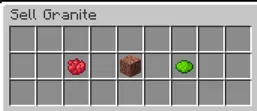
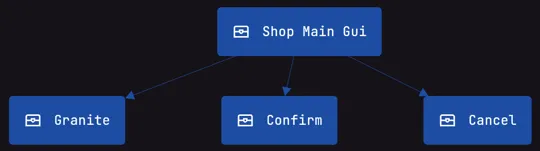
Now we need to make the items interactive. For this, use a Click Item Action on the confirm and cancel buttons.
Set the Click Item Action on the cancel button to close the GUI.
For the confirm button, we will need to set up a few more things first.
If the player has no granite in his inventory, we want to tell him that he can’t sell anything.
For this, we will use a Simple Message Action with the message “You have no granite to sell!”
Now we need to set up the selling part of the shop.
We want to give the player 5 gold nuggets for each granite he sells.
To do this, we will use a Give Item Action to give the player 5 gold nuggets and a Remove Item Action to remove 1 granite from the player’s inventory.
Finally, we want to close the GUI after the player has sold his granite.
The final setup for the confirm button should look something like this:
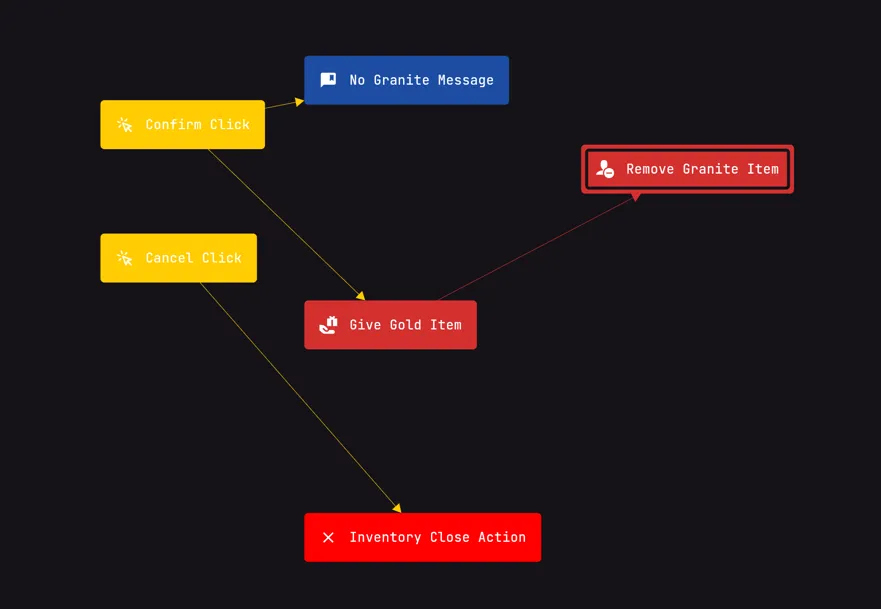
You can now test the selling part of the shop. If you have granite in your inventory, you should be able to sell it and receive gold nuggets.
However, players can only sell granite one at a time, so if someone want to sell all his granite at once, he will have to click the confirm button multiple times. Let’s fix this. To make it so the player can sell all his granite at once, we will use the Inventory Count Variable. Set the Inventory Count Variable to count the number of granite in the player’s inventory. Then, we will use a Calculated Variable to calculate the total amount of gold nuggets to give the player by multiplying the amount of items from the Inventory Count Variable by 5 (the amount of gold nuggets per granite). We will use the Calculated Variable in the Give Item Action to give the player the correct amount of gold nuggets and also in the Remove Item Action to remove the correct amount of granite from the player’s inventory. You can now test the selling part of the shop again. If you have multiple granite in your inventory, you should be able to sell them all by clicking the confirm button just once.